Help desk article - Only Admin Can Cancel/Close Purchase Orders

Apr 10, 2026
 0
0
Only Admin Can Cancel/Close Purchase Orders
Overview:
SmartOffice offers enhanced control over purchasing workflows through a setting that restricts cancellation and closure of purchase orders to Admin users only.
What This Setting Does:
When the "Only Admin can cancel/close order" setting is enabled:
Only Admin users will be able to cancel or close purchase orders and requisitions.
This means that:
- Admins have the permission to cancel/close.
- Approvers cannot cancel/close orders.
- Employees cannot cancel/close orders.
Where to Find the Setting
You can enable or disable this option by navigating to:
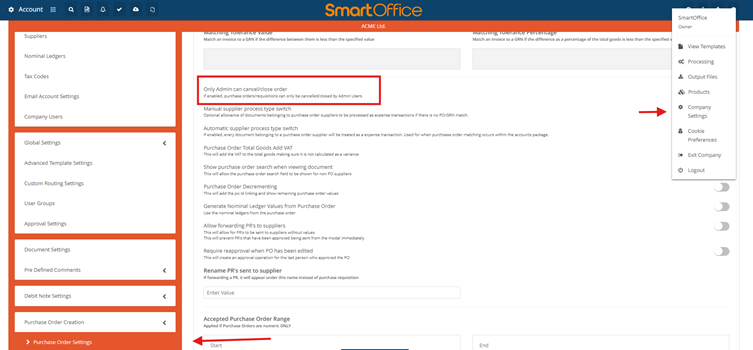
Menu ➜ Company Settings ➜ Purchase order settings. And toggle "Only Admin can cancel/close order"
Once toggled ON, this restriction becomes immediately active for all users within the company.